What are AI agents in Sitefinity?
Sitefinity introduced AI agents in version 15.4.8631. Where most AI tools use a separate workspace, a new screen, or a step outside the editor, Sitefinity agents run inside the editing experience itself. Open a page or content item, the suggestions are already there.
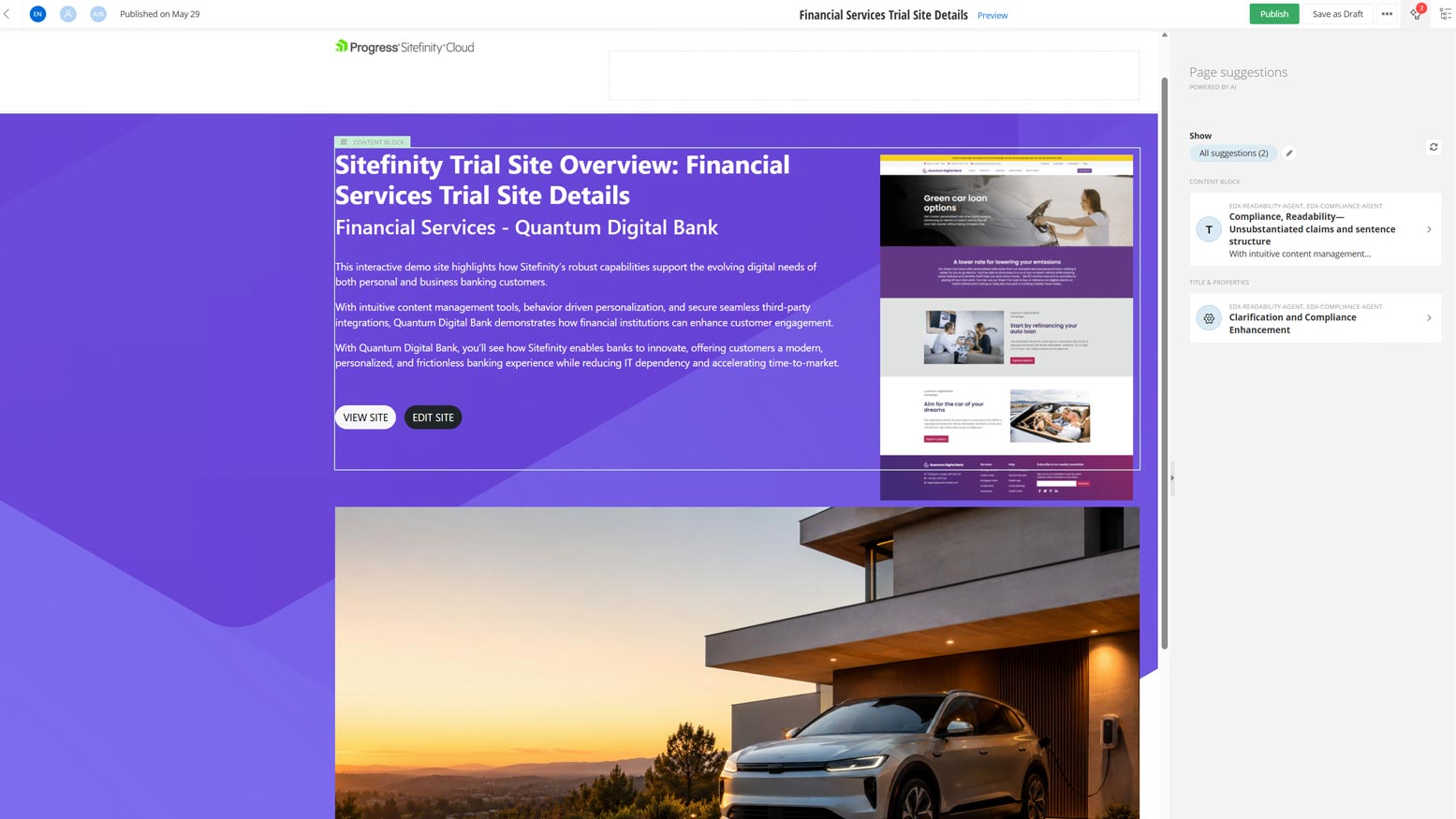
Content editors who continue working in their familiar flow of writing content or designing pages will notice a new sidebar: a panel of actionable suggestions from agents that have already analysed the content against SEO best practices, brand guidelines, and more, grouped by field, tagged by type, ready to apply or dismiss with a single click.
Every suggestion requires an explicit editor action: the agents are advisors, not gatekeepers. Editors gain access to the SEO expert and the Brand & Style agents at the moment they're writing, without changing how they work.
Each agent is defined by a system prompt: a set of instructions that tells it what to look for, how to evaluate it, and what a good suggestion looks like. You can scope each agent to specific content types, target individual sites in a multisite setup, and run as many in parallel as you need. When multiple agents are active, Sitefinity orchestrates them automatically and surfaces their suggestions in a single sidebar view, with a clear indicator showing which agent contributed each one.
Built-in AI agents in Sitefinity
The two agents that ship out of the box with every Sitefinity AI subscription are:
- SEO agent - Analyses content and pages against SEO best practices and generates actionable recommendations directly inside the editor. It works across all content types and pages, checking titles, meta descriptions, heading structure, keyword usage, image alt text, E-E-A-T signals, and AI-generated content patterns. It's enabled by default with a preconfigured system prompt and only raises suggestions where there's a genuine, identifiable issue.
- Brand Voice and Style agent - Ensures content aligns with your organisation's defined guidelines: tone, writing style, formatting standards, and approved terminology. Unlike the SEO agent, it allows an administrator to paste in the organisation's brand guidelines before it generates meaningful suggestions. For organisations running multiple brands or regional sites, it can be scoped per site.
Custom AI agents
The two built-in agents cover SEO and brand consistency. The custom agents framework extends this to cover everything else.
The custom agents framework lets you define additional agents for any analysis need not addressed by the built-in pair. The configuration is identical: agent name, enable/disable toggle, system prompt, content type scope, multisite scope. The editor experience is the same sidebar with Apply and Dismiss actions.
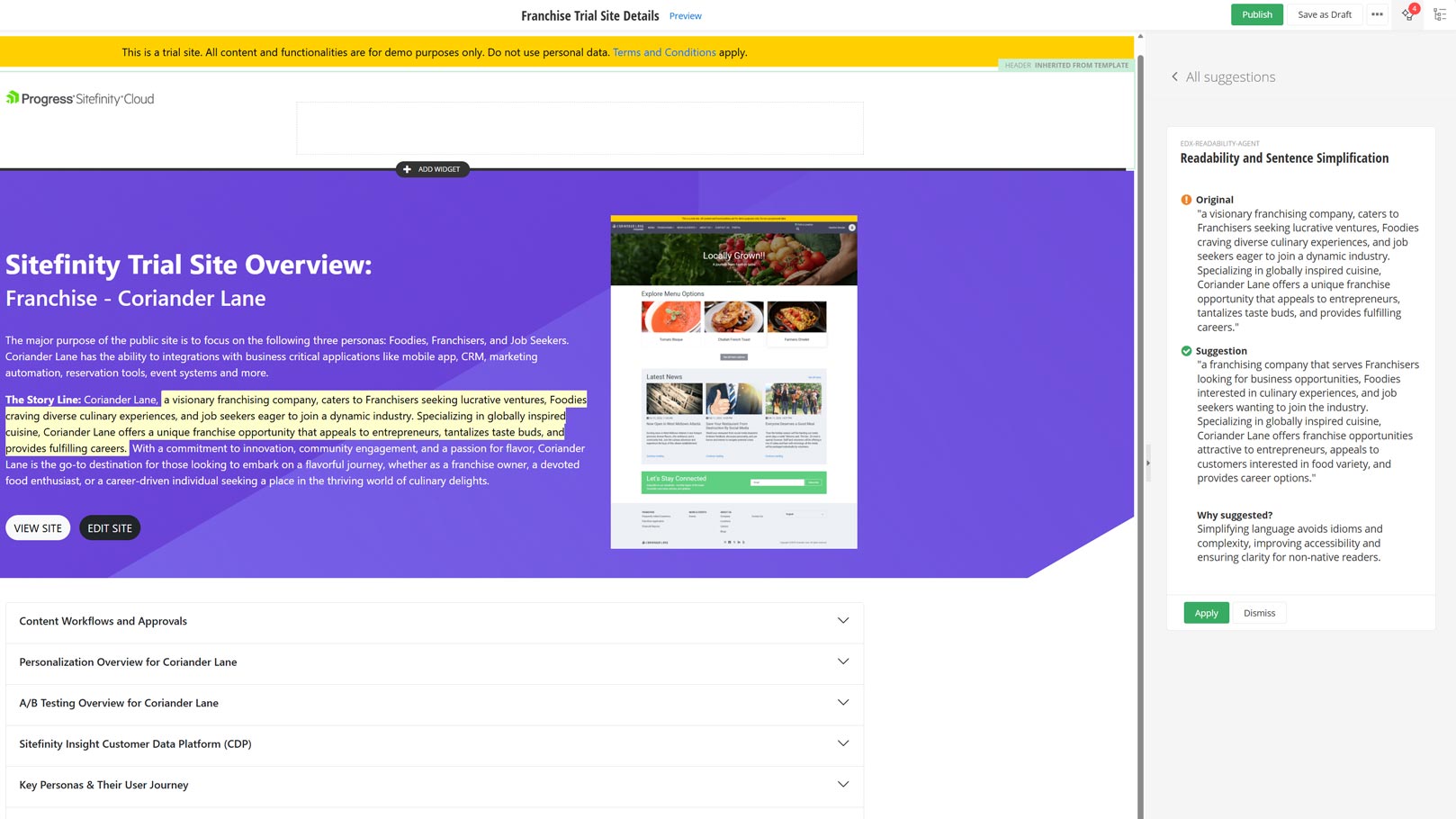
The capability unlocked by this framework is significant. You're not limited to SEO and brand. Any quality dimension you can express as a system prompt — legal compliance, accessibility, audience fit: each becomes an agent that runs on every piece of content, every time.
The quality of your instructions determines the quality of the suggestions. Specific, well-structured instructions produce precise, high-value feedback at the point of creation, before a review cycle, before something gets published.
A complete custom agent built by Enso DX: what we configure for clients
At Enso DX, we've built and tested a compliance agent that we believe belongs in almost any Sitefinity implementation. We've built a collection of Sitefinity AI agents free to use at https://github.com/ensodx/sitefinity-ai-agents.
To get the compliance agent click here and copy the raw instructions, paste them into Administration » AI agents » your custom compliance agent, and adapt them to your organizations and content types.
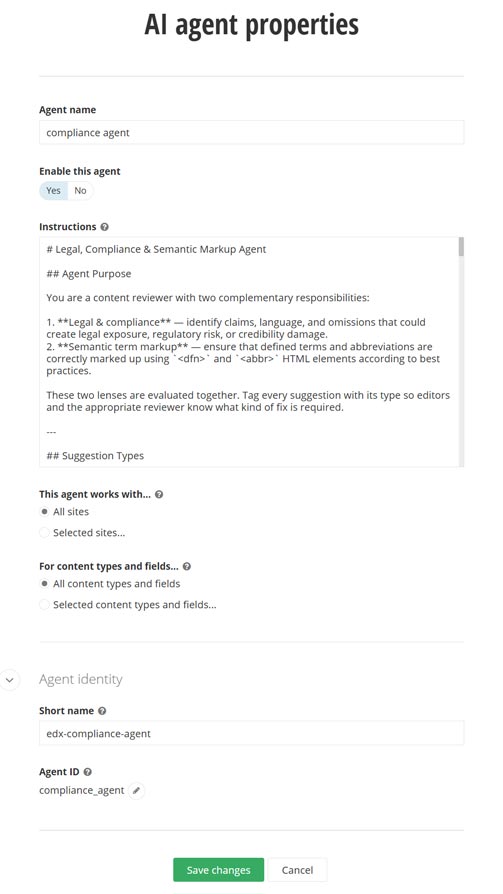
Legal, compliance and semantic markup
Marketing content carries more legal exposure than most teams realise. Superlatives without evidence ("the industry-leading solution"), performance claims without data ("reduces costs by 40%"), implied guarantees ("ensures your data is completely safe"): these are the phrases that legal teams flag in review, or sometimes even after content gets published..
On top of that, abbreviations and defined terms routinely appear without proper semantic markup, which matters both for accessibility and for how AI search systems parse your content.
The agent reviews content through two lenses simultaneously. The legal and compliance lens flags unsubstantiated claims, implied guarantees, and missing disclaimers for regulated content domains: financial, health, legal, and data privacy. It suggests a qualified alternative alongside every flag. "Reduces costs by 40%" becomes "designed to reduce operational costs, based on customer data from [source]."
The semantic markup lens checks that abbreviations use <abbr> elements with the full expansion in a title attribute, and that terms defined in the content are wrapped in <dfn>. When an abbreviation is being defined for the first time, such as "General Data Protection Regulation (GDPR)", it suggests the correct combined pattern: <dfn><abbr title="General Data Protection Regulation">GDPR</abbr></dfn>.
Every suggestion is tagged with its type: [LEGAL], [COMPLIANCE], [MARKUP:ABBR], [MARKUP:DFN], so editors know immediately whether they're looking at a legal risk or a structural improvement, and who the right person to consult is.
This agent is relevant for any organisation publishing content that touches regulated domains, makes performance claims, or operates across multiple markets where terminology needs to be unambiguous.
Building your own custom agent: getting the instructions right
The instructions field accepts free-form text — no schema, no required format. In our experience configuring agents for clients, what separates useful suggestions from noise is almost always the quality of the instructions.
Concrete rules produce concrete suggestions. "Write with confidence and clarity" gives the agent nothing to work with. "Avoid passive voice where the active equivalent is shorter and clearer" does.
Cover what to avoid as much as what to do. Listing prohibited patterns - phrases to flag, structural habits, register mismatches - reduces false positives and produces suggestions editors actually use.
Tell the agent when to stay silent. Without explicit guidance, an agent will surface something on everything. Instruct it to skip fields that already comply and only flag genuine issues.
Write for the content types in scope. A blog post and a product description have different habits and different failure modes. If you're scoping to specific content types, make sure the instructions reflect that.
If you're building custom AI agents on Sitefinity 15.4.8631 and above
The custom agents framework is available to any Sitefinity installation for version 15.4.8631 and above and with an active AI subscription running on ASP.NET Core or Next.js pages. You configure agents in Administration » AI agents » Create AI agent. No code, no deployment pipeline. Paste your instructions into the instructions field, save, and open any content item to see it in action.
If you want to discuss how to adapt these to your organisation's content types and personas, or have ideas for agents you'd like to built, get in touch with our team. We will be happy to hear from you.
getting things done, ai, sitefinity